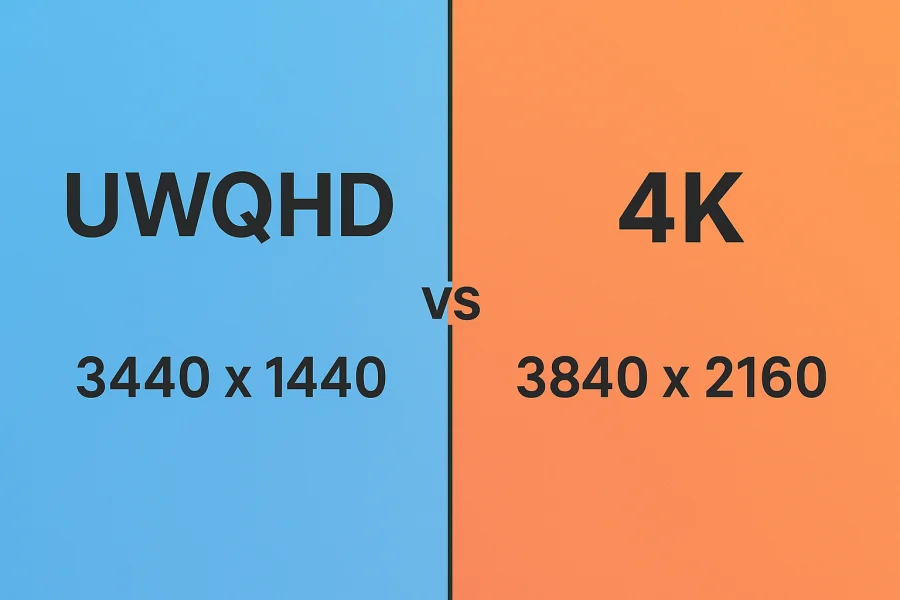
The modern display market offers two compelling resolutions that dominate different use cases: UWQHD (Ultra-Wide Quad HD) at 3440×1440 pixels and 4K (Ultra High Definition) at 3840×2160 pixels.
While both offer significant upgrades over standard 1440p or 1080p monitors, they approach visual clarity in fundamentally different ways. UWQHD stretches your workspace horizontally with a 21:9 aspect ratio, while 4K prioritizes pixel density within a traditional 16:9 frame.
This comparison matters deeply for gamers seeking immersion, professionals juggling multiple windows, and content creators demanding precision. The choice between them isn’t about which is objectively better – it’s about which aligns with your specific workflow and priorities.
Resolution & Aspect Ratio Basics
To understand these displays, you need to grasp how they structure pixels differently.
UWQHD packs 3440 pixels horizontally and 1440 pixels vertically, creating a 21:9 aspect ratio. This dramatically wider-than-normal shape gives you significantly more horizontal real estate than a standard monitor. If you imagine a typical 16:9 display as a rectangle, UWQHD is that rectangle stretched horizontally until it resembles a cinema screen.
4K UHD (the “standard” 4K) delivers 3840×2160 pixels in the traditional 16:9 ratio—essentially four times the pixels of 1080p arranged in a square, balanced frame. Every dimension gets more pixels, creating a denser visual field.
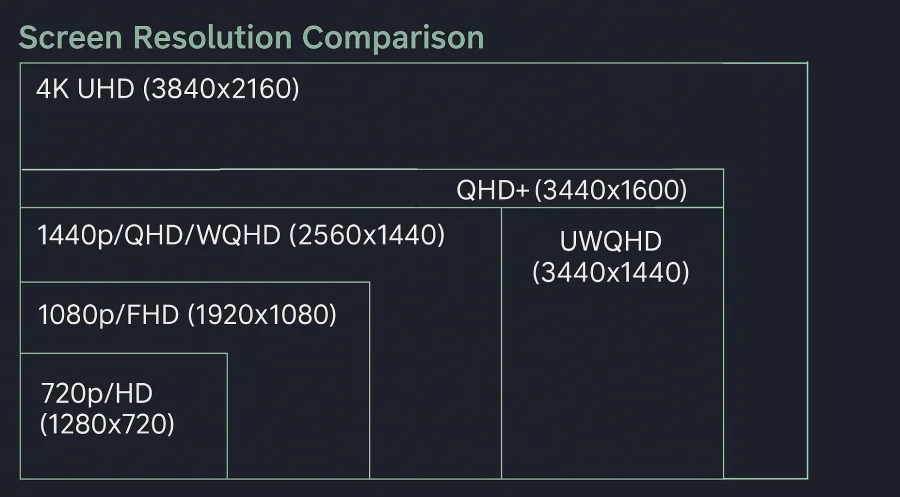
The visual impact differs markedly. UWQHD prioritizes width, giving you room to spread work across the screen. 4K prioritizes sharpness, packing more detail into a conventional viewing area. One offers breadth; the other offers depth.
Productivity & Multitasking
For knowledge workers and creative professionals, display choice directly impacts efficiency.
UWQHD excels at horizontal multitasking. Those extra pixels to the left and right mean you can comfortably run three applications side-by-side without significant overlap. Financial analysts appreciate UWQHD for keeping multiple spreadsheet columns visible. Video editors benefit from expanded timeline windows. Programmers gain more code visible at once without scrolling. The extra horizontal space transforms single-monitor setups into pseudo-dual-monitor experiences without the physical bezel dividing your view.
4K delivers superior sharpness for detail work. Text rendering is crisper, making long editing sessions less fatiguing. Photo retouchers see fine details with remarkable clarity. Architects and CAD designers appreciate the ability to view complex drawings with precision. The extra pixels go toward clarity rather than breadth, making 4K the preference for professions where pixel-level precision matters.
Accountants and traders gravitate toward UWQHD. Designers and photographers lean toward 4K. The distinction maps cleanly onto whether your profession benefits more from seeing more simultaneously or seeing more clearly.
Gaming Experience
Gaming preferences diverge sharply between these resolutions, influenced by both technical and psychological factors.
UWQHD creates an immersive, expansive field of view. Games rendered at 21:9 eliminate the typical black bars you’d see on ultrawide displays and provide roughly 15 degrees of additional peripheral vision compared to standard 16:9 gaming. This extra immersion transforms racing games into thrilling simulations where the world naturally extends into your peripheral vision. First-person shooters gain tactical advantages and cinematic moments.
However, UWQHD comes with caveats. Not all games natively support 21:9; some default to 16:9 with black bars or stretch the image unnaturally. Support has improved significantly, but incompatibility remains an occasional frustration.
4K gaming delivers uncompromising visual detail and clarity. Textures appear sharper, distant objects remain defined, and the overall image fidelity reaches a new standard. Every game ever released supports 4K on standard displays, eliminating compatibility concerns entirely.
The trade-off? GPU demand. Rendering 4K requires substantially more graphics processing power than UWQHD. Maintaining high frame rates at 4K demands flagship graphics cards, while UWQHD can deliver smooth performance on more modest hardware. If you’re pushing 100+ frames per second, UWQHD becomes more achievable than 4K on the same graphics card.
Media & Entertainment
Your content consumption habits influence which display better serves your entertainment needs.
UWQHD suits cinematic experiences. Many films and streaming series shot in anamorphic formats align closer to 21:9 than 16:9, meaning ultrawide displays show these with minimal black bars. The expansive screen creates a theater-like presence perfect for immersive storytelling.
4K is the entertainment industry standard. Modern streaming platforms (Netflix, Disney+, Amazon Prime) increasingly offer 4K content. Blu-ray movies are mastered in 4K. YouTube’s premium content targets 4K. Television manufacturers have collectively standardized on 16:9 4K as the default consumer resolution. This means UWQHD users sometimes experience letter-boxing or stretched content that wasn’t optimized for their aspect ratio.
For Netflix and YouTube consumption, 4K feels more naturally aligned with available content. For cinema and specialized streaming, UWQHD can feel tailor-made.
Hardware & Performance Requirements
The practical realities of driving these displays differs significantly.
GPU demands: 4K requires substantially more graphical processing power. Rendering twice as many pixels in every direction means your graphics card works substantially harder. High-refresh 4K (above 60Hz) becomes especially demanding. UWQHD occupies a middle ground—more demanding than 1440p, but more forgiving than 4K—making it attractive for those using mid-range graphics hardware.
Refresh rates and responsiveness: UWQHD monitors commonly ship at 120Hz, 144Hz, or even 165Hz at reasonable prices. 4K monitors typically max out at 60Hz or 120Hz at premium price points. If you game competitively or value responsiveness, UWQHD’s higher refresh-rate availability becomes attractive. High-refresh 4K gaming exists but commands premium prices and requires powerful hardware.
Cost: UWQHD monitors have become increasingly affordable, with quality options available at $300-600. Comparable 4K monitors typically cost $400-800, and high-quality 4K panels push toward $1000+. The cost difference compounds when factoring in the GPU upgrade often required for 4K gaming.
Pros & Cons Summary
| Feature | UWQHD | 4K |
|---|---|---|
| Resolution | 3440×1440 | 3840×2160 |
| Aspect Ratio | 21:9 | 16:9 |
| Pixel Density | Lower | Higher |
| Horizontal Space | Expansive | Standard |
| Gaming Immersion | Excellent (with support) | Very Good |
| Gaming Performance | More Achievable | Demanding |
| Content Support | Growing (with caveats) | Universal |
| Productivity | Superior for multitasking | Superior for detail work |
| Refresh Rates | Higher options available | Limited options |
| Cost | Budget-friendly | Premium |
Conclusion
Your choice between UWQHD and 4K depends fundamentally on how you spend your time at the screen. UWQHD rewards those who prioritize horizontal workspace and immersive gaming, offering an unconventional perspective that transforms both work and play. 4K serves those who value universal content support and razor-sharp detail, betting that universal compatibility and visual sharpness matter more than extra horizontal real estate.
If you’re a video editor, stock trader, or competitive gamer, UWQHD likely delivers greater satisfaction. If you’re a photo professional, graphics designer, or casual user wanting a display that handles everything well, 4K probably suits you better. Neither choice is objectively superior, success comes from matching your monitor to your actual needs rather than chasing raw specifications.
Read Next
Device Pixel Ratio (DPR): The Relationship Between CSS Pixels and Physical Pixels

4K Resolution: Ultimate Experience for TVs and Monitors

Gorilla Glass and Beyond: The Materials Behind Ultra-Tough Screens
QLED vs OLED: Understanding the Future of Television Display Technology
GTG vs MPRT: Display Response Times Explained

2K Resolution Size: Understanding the Midpoint Between HD and 4K

Retina Displays vs. 300 DPI: A Deep Dive into Perceived Resolution
Blue PHOLED: Illuminating The Future of High-Efficiency Displays

MLA OLED: Brighter Displays with Micro Lens Array
HDR10 vs HDR400 vs HDR600 vs HDR1000: Choosing the Right HDR Standard

LTPO OLED Display Technology: AMOLED Gets Adaptive

UWQHD: Ultra-Wide Quad HD Resolution Explained

V-SYNC: What Is It And Should You Use It?