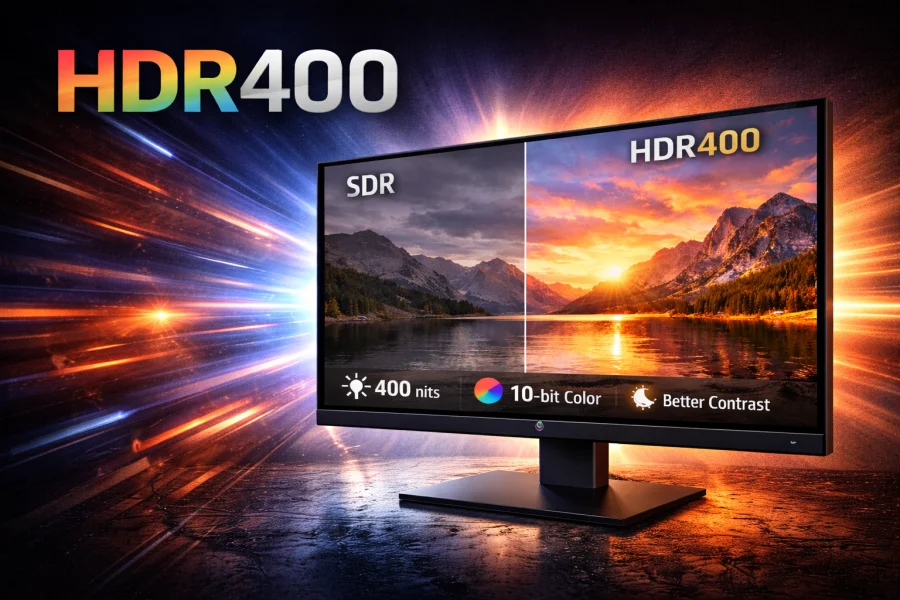
The world of display technology can be overwhelming, with acronyms and certifications competing for your attention.
Among these, HDR400 stands as one of the most common—and most debated—specifications you’ll encounter when shopping for a new monitor. But what exactly is HDR400, and is it worth your consideration?
What is HDR and DisplayHDR Certification?
High Dynamic Range (HDR) represents a significant leap forward in display technology, offering brighter highlights, deeper blacks, and a wider range of colors compared to traditional Standard Dynamic Range (SDR) displays. The result is images that more closely resemble what the human eye sees in the real world, with details visible in both the brightest and darkest parts of a scene.
The Video Electronics Standards Association (VESA) created the DisplayHDR certification program to bring order to the HDR market and provide consumers with clear, testable standards. The program includes several tiers – HDR400, HDR500, HDR600, HDR1000, HDR1400, and even higher, each with progressively more demanding requirements.
HDR400 sits at the entry level of this certification hierarchy, representing the minimum threshold for a display to be considered “HDR-capable” under VESA’s standards.
HDR400 Technical Specifications
To earn the DisplayHDR 400 certification, a monitor must meet specific technical criteria that differentiate it from standard SDR displays.
Peak Brightness: The display must achieve a peak brightness of at least 400 cd/m² (candelas per square meter), also known as nits. This represents a noticeable increase over typical SDR monitors, which usually hover around 250-350 nits.
Black Levels: HDR400 requires a black level of 0.40 cd/m² or less, ensuring adequate contrast for HDR content.
Color Gamut: Displays must cover at least 99% of the BT.709/sRGB color space and 90% of the DCI-P3 color space. This is a notable improvement over typical SDR displays, which usually cover around 95-100% of sRGB but often fall short on the wider DCI-P3 gamut.
Bit Depth: The specification requires a minimum of 8-bit color depth with 2-bit dithering (8b+2) at the driver IC level. This Frame Rate Control (FRC) dithering effectively simulates 10-bit color (1.07 billion colors) from a native 8-bit panel (16.7 million colors), allowing for smoother color gradients and reduced banding in HDR content. While not as ideal as native 10-bit processing, 8-bit + FRC delivers sufficient color depth for most users to avoid visible color banding in typical viewing scenarios.
Dimming Zones: Critically, HDR400 does not require local dimming zones. Most HDR400 displays use global dimming, meaning the entire backlight adjusts uniformly rather than in specific zones. This is perhaps the most significant limitation of the standard.
How HDR400 Compares to Other Standards
Understanding where HDR400 fits in the broader landscape helps clarify its strengths and limitations.
HDR400 vs. HDR600: HDR600 displays must reach 600 nits peak brightness and are required to have local dimming with at least some capability for zone-based control. This results in noticeably better contrast and a more authentic HDR experience. HDR600 also typically requires wider color gamut coverage 95% DCI-P3.
HDR400 vs. HDR1000: The difference here is dramatic. HDR1000 displays must achieve 1,000 nits peak brightness with sophisticated local dimming and must cover 95% or more of the DCI-P3 color space. These displays deliver the cinematic HDR experience that enthusiasts seek, with stunning highlights and deep, inky blacks.
HDR400 vs. SDR: Compared to standard SDR displays, HDR400 monitors offer higher peak brightness, improved color processing, and wider color gamut. This wider color space means more vibrant, saturated colors that SDR displays simply cannot reproduce. However, since HDR400 displays typically lack local dimming, they can’t deliver the deep blacks and high contrast that define the premium HDR experience, making the overall improvement more noticeable in bright, colorful content than in dark, atmospheric scenes.
| Feature | SDR | HDR400 | HDR600 | HDR1000 |
|---|---|---|---|---|
| Peak Brightness | ~250-350 nits | 400 nits | 600 nits | 1,000 nits |
| Local Dimming | No | No | Yes | Yes (advanced) |
| Color Gamut | ~100% sRGB | 99% sRGB / 90% DCI-P3 | 99% sRGB / 95% DCI-P3 | 99% sRGB / 95% DCI-P3 |
| Bit Depth | 8-bit | 8b+2 | 8b+2 | 8b+2 |
Real-World Performance
So what does HDR400 actually look like in practice?
Noticeable Improvements: When viewing HDR content, you’ll see brighter highlights than on SDR displays—the sun glinting off water, explosions in movies, or light sources in games will have more pop and presence. The 10-bit color processing also helps eliminate banding in gradients, particularly in skies and subtle color transitions.
The Limitations: Without local dimming, HDR400 displays struggle with one of HDR’s most important aspects: simultaneous bright highlights and deep blacks. When a scene contains both very bright and very dark elements, the global backlight must compromise, often resulting in elevated black levels (the “grey blacks” problem) or dimmed highlights. This fundamentally limits the contrast ratio and can make dark scenes look washed out.
Best Use Cases: HDR400 performs best with content that features bright, colorful scenes without demanding deep blacks—think vibrant landscapes, well-lit gaming environments, or daytime footage. Productivity work also benefits from the higher brightness, making HDR400 monitors good all-rounders for mixed use.
Content Considerations: Not all HDR content is created equal. Streaming services like Netflix and Disney+ offer HDR content that can look moderately better on HDR400 displays compared to SDR. However, premium HDR content mastered for theatrical release or high-end displays won’t reach its full potential without higher-tier HDR capabilities.
Is HDR400 Worth It?
The million-dollar or more accurately, the hundred-dollar question: should you buy an HDR400 monitor?
Price Considerations: HDR400 certification typically adds $50-150 to a monitor’s price compared to an otherwise identical SDR model. Meanwhile, jumping to HDR600 often means an additional $200-400, and HDR1000 displays command premium prices of $800 and up.
Who Should Consider HDR400:
- Budget-conscious buyers who want some HDR capability without breaking the bank
- General-purpose users who consume a mix of SDR and HDR content
- Gamers playing titles with bright, colorful art styles
- Productivity users who value higher brightness for well-lit rooms
- Anyone upgrading from an older, dimmer SDR display
When to Invest in Higher-Tier HDR:
- Serious movie enthusiasts who watch premium HDR content
- Gamers who prioritize visual quality and play atmospheric, dark games
- Content creators working with HDR material
- Anyone with the budget who wants a noticeable difference from SDR
- Users in dark viewing environments where contrast is critical
Common Criticisms: The HDR community is divided on HDR400. Critics argue it’s “HDR in name only” pointing out that without local dimming and wider color gamuts, it fails to deliver the transformative experience HDR promises. Some suggest that HDR400 is primarily a marketing term that allows manufacturers to slap “HDR” on affordable monitors without providing true HDR performance.
Supporters counter that HDR400 offers tangible improvements over SDR at an accessible price point, and that dismissing it entirely ignores the value it provides for everyday users who aren’t display purists.
Conclusion
HDR400 occupies an interesting and somewhat controversial position in the display market. It represents the entry point to HDR technology, a toe in the water rather than a full dive. While it won’t deliver the jaw-dropping contrast and color that higher-tier HDR certifications provide, it does offer measurable improvements over standard SDR displays, particularly in peak brightness and color processing.
Final Recommendations: If you’re shopping for a new monitor and can find an HDR400 model within your budget without significant compromise on other features (resolution, refresh rate, panel type), it’s a worthwhile upgrade over SDR. The brighter display and improved color handling will benefit both HDR and SDR content.
However, if you’re specifically buying a monitor for its HDR capabilities, perhaps you’re a cinephile building a home theater setup or a gamer who wants that next-gen visual experience – save your money and invest in HDR600 or higher. The difference between true HDR with local dimming and HDR400’s more modest capabilities is substantial enough to justify the wait and additional expense.
In the end, HDR400 is best viewed as what it is: an affordable step up from SDR that provides some HDR benefits without the premium price. Temper your expectations, understand its limitations, and you’ll find it a perfectly serviceable option for everyday computing and entertainment.
Read Next
QLED vs UHD: What’s the Difference and Which One Actually Matters?
HDR10 vs HDR10+ in Gaming: What’s the Difference and Does It Matter?
Mini LED vs OLED: Which Display Technology Reigns Supreme?

Best VPN for Security, Privacy, and Unblocking Content
QHD vs. OLED: Resolution, Panel Tech, and What Actually Matters

What is My Screen Resolution
Google TV vs Samsung Tizen: Which Smart TV Platform Is Right for You?

LG 32GQ950-B Review: Nano IPS 1ms (GtG) 144Hz; High-End 4K Gaming

Hybrid Log–Gamma (HLG): Combining SDR and HDR

1440p Resolution: The Definitive Guide to QHD
FHD vs 4K: Is the Upgrade Worth It?
HD vs HDR: Differences and Benefits

Full Array Local Dimming: The Key to Superior Contrast