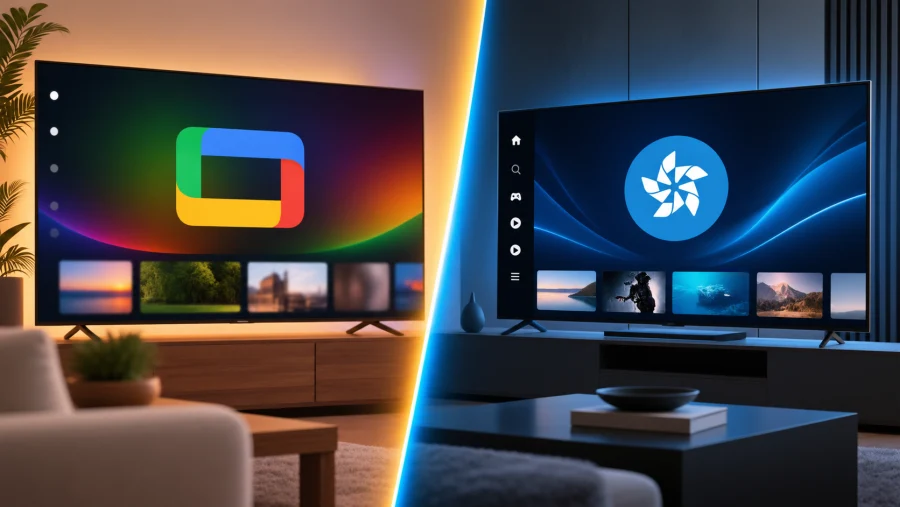
Choosing a new television today means choosing an operating system as much as a screen. The two most common platforms shoppers run into are Google TV, found on brands like Sony, TCL, Hisense, and Philips, and Tizen, Samsung’s in house software that ships exclusively on its own sets.
Both promise a smooth, app rich experience, but they take noticeably different approaches to navigation, ecosystem integration, and long term value.
This comparison breaks down the key differences so you can decide which platform actually fits how you watch, play, and control your smart home.
Platform Overview
Google TV is the evolution of Android TV, built around Google’s recommendation engine and account system. It appears across a wide range of manufacturers, which means the experience can vary slightly depending on the hardware it runs on, but the core software stays consistent.
Its biggest strength is that it plugs directly into the Google account most people already use for email, photos, and search.
Tizen, on the other hand, is Samsung’s proprietary operating system used only on Samsung televisions. Because Samsung controls both the software and hardware, Tizen tends to feel more tightly optimized for the specific set it’s running on.
It has also grown into a broader ecosystem tool, powering not just TVs but some of Samsung’s other smart devices as well.
User Interface and Navigation
Google TV organizes its homescreen around content rather than apps. When you turn on the TV, you’re greeted with personalized profiles and a scrolling list of recommended shows and movies pulled from your streaming subscriptions.
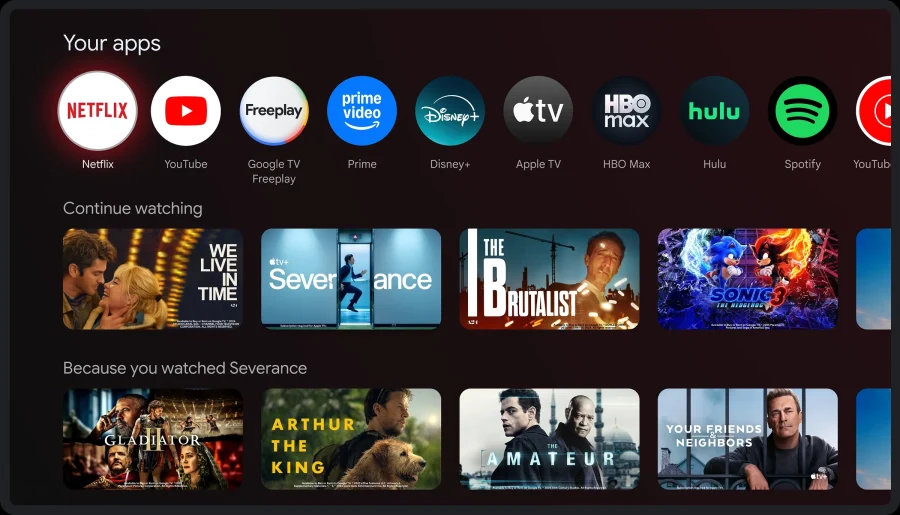
This content first approach can feel intuitive if you like discovering what to watch without hunting through individual apps, though power users sometimes find it cluttered or overly promotional.
Tizen takes a more traditional, app focused approach. Its interface leans on a customizable home shelf where users can pin favorite apps and rearrange tiles to their liking. It tends to read as cleaner and more minimalist, with less emphasis on algorithmic suggestions and more control handed to the user over what appears where.
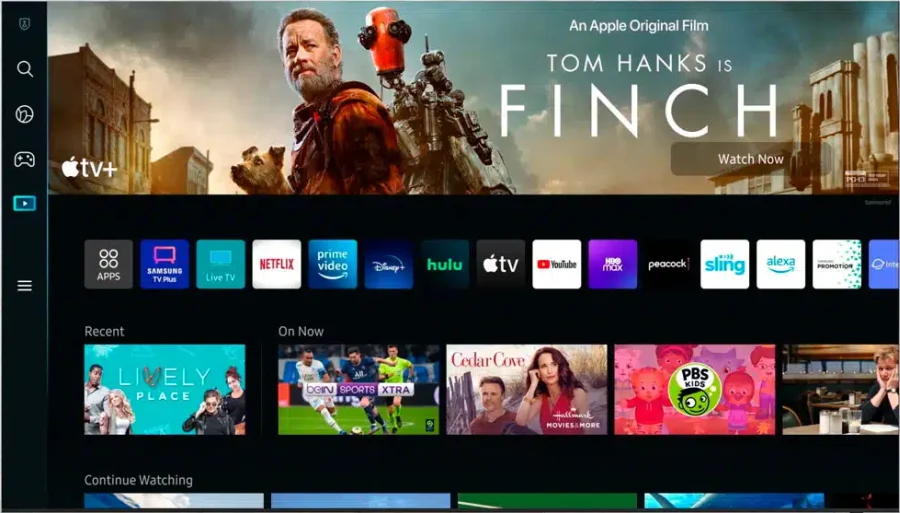
If you prefer picking your own app rather than being steered by algorithmic picks, Tizen’s layout will likely feel more comfortable.
App Ecosystem and Content Availability
Google TV benefits from the Google Play Store, which generally offers broader third party app support and faster rollout of new streaming services and niche apps.
Because so many manufacturers use Google TV, developers have an incentive to prioritize it, which usually means fewer gaps in the catalog.
Samsung’s app store, run through Tizen, is solid but occasionally lags behind on updates or exclusivity. Some apps roll out to Samsung sets later than they do on Google TV devices, and a handful of niche services may never arrive at all.
That said, Samsung’s massive global market share gives it enough leverage that most major streaming platforms remain a priority, so this gap is narrowing over time.
Voice Assistant, Smart Home, and Gaming
Google TV comes with native Google Assistant support, which means deep integration with Google Home and Nest devices.
If your smart home already runs on Google’s ecosystem, thermostats, cameras, speakers, this platform will feel like a natural extension rather than a separate system to manage.
Tizen uses Bixby as its default assistant, tied into Samsung’s SmartThings ecosystem. SmartThings has become a fairly robust smart home hub in its own right, especially if you own other Samsung appliances or devices.
Many newer Samsung TVs also support Alexa or Google Assistant as secondary options, which softens the lock in somewhat.
On the gaming side, Google TV offers access to Google Play Games and cloud gaming services like GeForce Now, letting you stream titles without a console. Tizen counters with Samsung Gaming Hub, which bundles multiple cloud gaming services into one interface along with a Game Bar for adjusting settings like resolution and input lag on the fly.
Both platforms have made real investments here, so gaming shouldn’t be a dealbreaker either way unless you have a strong preference for a specific cloud service.
Performance, Hardware, and Display Synergy
Because Google TV runs across many different manufacturers, performance can vary depending on the chipset each brand uses. A high end Sony or TCL set will feel snappy, while a budget model from a lesser known brand might show more lag or slower app loading.
This inconsistency is the tradeoff for having so many hardware choices.
Tizen benefits from Samsung’s vertical integration. Since Samsung builds both the processor and the software, the two are tuned to work together, which generally results in more consistent performance across its lineup.
This pairing also extends to picture quality, Samsung’s QLED and Neo QLED panels are designed alongside Tizen’s picture processing engine, creating a more unified visual experience.
Google TV brands vary more widely in panel technology, so picture quality depends heavily on which manufacturer you choose rather than the software itself.
Privacy, Ads, and Software Longevity
Both platforms collect viewing data to power recommendations and targeted advertising, and neither is free of ads on the homescreen. Google TV’s recommendation heavy interface means promotional content appears fairly prominently, often blending suggested shows with sponsored placements.
Tizen’s more app centric layout tends to push ads into a dedicated row rather than mixing them into content suggestions, which some users find less intrusive.
On longevity, this is where software update support really matters. Samsung has a reputation for supporting its TVs with updates for several years, partly because it controls the entire stack and doesn’t need to wait on multiple manufacturers.
Google TV update timelines depend more on the individual brand, some, like Sony, are diligent about pushing updates, while budget brands may slow down support sooner. If you plan to keep your TV for many years, checking a specific manufacturer’s update track record matters more with Google TV than with Tizen.
Price and Value
Google TV shows up across a huge price range, from budget friendly TCL and Hisense models to premium Sony sets, which means there’s likely an option at whatever price point you’re shopping.
This variety is one of the platform’s biggest advantages: you’re not locked into one brand’s pricing structure.
Tizen is only available on Samsung TVs, so pricing follows Samsung’s own tiers, from affordable Crystal UHD models to high end Neo QLED and OLED sets.
You won’t find Tizen on a budget third party brand, but Samsung’s own lineup does span a wide enough range to fit most budgets.
| Feature | Google TV | Tizen |
|---|---|---|
| Interface style | Content first, recommendation driven | App focused, customizable |
| App availability | Broader, faster rollout | Solid, occasional delays |
| Voice assistant | Google Assistant | Bixby (plus Alexa/Google options) |
| Smart home hub | Google Home/Nest | SmartThings |
| Performance consistency | Varies by brand | Consistent (Samsung hardware) |
| Update support | Depends on manufacturer | Generally strong |
| Hardware availability | Multiple brands | Samsung only |
Verdict: Which Should You Choose?
If your smart home already runs on Google devices, or you want the flexibility of shopping across multiple TV brands and price points, Google TV is the stronger fit. Its content first interface and wide manufacturer support make it a versatile choice, especially if you’re comfortable researching individual brands for performance and update reliability.
If you’re already invested in Samsung’s ecosystem, whether through SmartThings, other Samsung appliances, or simply a preference for tightly integrated hardware and software, Tizen offers a more consistent and polished experience. Its longer update support and unified performance make it a dependable option if you plan to keep your TV for the long haul.
Neither platform is objectively better, the right choice comes down to which ecosystem you’re already living in and how much you value hardware variety versus integrated consistency.
Q&A
Can I install Android apps on Tizen?
No, Tizen and Android use different underlying architectures, so standard Android APK files won’t run on a Samsung smart TV. Tizen has its own app store with versions of most major apps built specifically for the platform, but you can’t sideload Android apps the way you might on an Android phone or tablet.
Can I change Tizen to Android?
No, Tizen is built into the TV’s firmware at a hardware level, and there’s no official way to replace it with Android TV or Google TV. Some tech enthusiasts have experimented with external Android TV boxes or streaming sticks plugged into a Samsung TV’s HDMI port, but this runs Android alongside Tizen rather than replacing it.
Does Tizen have a Play Store?
No, Tizen does not use the Google Play Store. Samsung runs its own app marketplace, sometimes called the Smart Hub or Samsung Apps store, where you can browse and download apps built for Tizen specifically. The selection covers all the major streaming services, though it may lag behind Google Play on niche or newly released apps.
What apps are available on Tizen?
Tizen supports all the major streaming platforms, including Netflix, Disney+, Amazon Prime Video, YouTube, and most regional and live TV services. It also includes Samsung’s own apps like Samsung TV Plus for free live channels, along with gaming apps through Samsung Gaming Hub. Coverage is strong for mainstream services, though some smaller or newly launched apps may take longer to arrive compared to Google TV.
Can I install Android TV on my Samsung Tizen Smart TV?
No, Samsung TVs are locked to Tizen and don’t support flashing or installing Android TV as a replacement operating system. If you want an Android TV or Google TV experience on a Samsung screen, the practical workaround is connecting an external device, like a Chromecast with Google TV or an Android TV box, through an HDMI port rather than modifying the TV itself.
Read Next
MSI G2712 Review: IPS 1920×1080 1ms 170Hz; Blend of Performance and Value
WQHD vs QHD – Understanding the Differences and Choosing the Right Resolution
HDR Gaming: Elevating Entertainment with Realism
QLED vs UHD: What’s the Difference and Which One Actually Matters?
HDR400: Understanding Entry-Level HDR Display Technology
1ms MPRT Response Time: The Key to Smoother Gaming
HGiG Mode for HDR gaming: Explanation
Asus TUF Gaming VG289Q1A Review: A Budget-Friendly 4K Monitor for Gamers and Content Creators
HD vs 2K vs 4K: Understanding Display Resolutions
HD vs HDR: Differences and Benefits
HDR10 vs HDR10+ vs Dolby Vision: HDR Formats Explained

144Hz vs 240Hz: Which Refresh Rate Actually Matters?
Dell G2422HS Review: 165Hz 1ms 1920 x 1080 IPS; Budget Gamer’s Delight