If you have shopped for a gaming monitor in the last few years, you have probably run into a wall of numbers: 60Hz, 144Hz, 165Hz, 240Hz, even 360Hz. Two of these numbers dominate the mid-to-high end of the market and spark the most debate among gamers: 144Hz and 240Hz.
Both promise smoother, more responsive gameplay than a standard display, but the gap between them is smaller than marketing often suggests, and the right choice depends heavily on your hardware, budget, and what you actually play.
This article breaks down what refresh rate really means, what each option offers, and how to decide which one fits your setup.
Refresh Rate Basics
Refresh rate refers to how many times per second a monitor redraws the image on screen, measured in Hertz (Hz). A 144Hz display refreshes the image 144 times every second, while a 240Hz display does so 240 times per second. The higher the number, the smoother motion appears, since there is less time between each frame update.
It is important not to confuse refresh rate with frame rate (FPS), which measures how many frames your graphics card actually produces each second. A monitor’s refresh rate is simply the ceiling for how many frames can be displayed.
If your GPU only outputs 90 frames per second, a 240Hz panel will not magically create more frames; it will just sit idle for the difference. To benefit from a higher refresh rate, your system needs to consistently produce frame rates that come close to matching it.
Refresh rate also plays a major role in perceived motion clarity. Faster refresh rates reduce the appearance of motion blur, particularly during quick camera movements or fast-paced action, making objects easier to track with your eyes. This is one of the main reasons competitive gamers care so much about pushing refresh rates higher.
144Hz Overview
144Hz has become something of a sweet spot in the gaming monitor market. Compared to a standard 60Hz or 75Hz display, it offers a dramatic improvement in smoothness, cutting down on motion blur and making fast movement feel noticeably more fluid.
It suits a wide range of use cases. Competitive gamers get a real edge in reaction time and tracking accuracy, while casual gamers simply enjoy a smoother overall experience. It also works well for general use and content creation, where the added fluidity makes scrolling, video editing timelines, and everyday navigation feel snappier.
On the hardware side, 144Hz is far more attainable than higher refresh rates. A mid-range graphics card paired with a reasonably modern CPU can hit 144 FPS in many titles, especially at 1080p or with some settings adjustments at 1440p. This makes it accessible without requiring a top-of-the-line rig.
Price-wise, 144Hz monitors have become mainstream and affordable. Budget options exist at relatively low price points, and even monitors with additional features like IPS panels or higher resolutions remain reasonably priced compared to their 240Hz counterparts.
240Hz Overview
240Hz pushes smoothness further, and while the visual difference compared to 144Hz is less dramatic than the jump from 60Hz to 144Hz, dedicated gamers often describe the extra fluidity as noticeably tighter, especially during fast, erratic motion like quick flicks and rapid direction changes.
This refresh rate shines in fast-paced competitive shooters and esports titles, where split-second reactions matter. Games like first-person shooters benefit the most, since every fraction of a second saved on visual feedback can translate into a real competitive advantage.
For slower-paced genres like strategy games or story-driven titles, the benefit is far less noticeable.
Hardware demands increase substantially at this tier. To take full advantage of 240Hz, your system needs to consistently push out 240 frames per second, which usually requires a high-end graphics card, especially at resolutions above 1080p.
Many competitive players pair 240Hz monitors with lower in-game settings specifically to maintain those frame rates, prioritizing smoothness over visual fidelity.
240Hz monitors also tend to sit at a premium price point. They often come bundled with additional features such as faster response times, esports-oriented designs, and sometimes higher-end panel technology, all of which add to the cost compared to a typical 144Hz display.
Head-to-Head Comparison
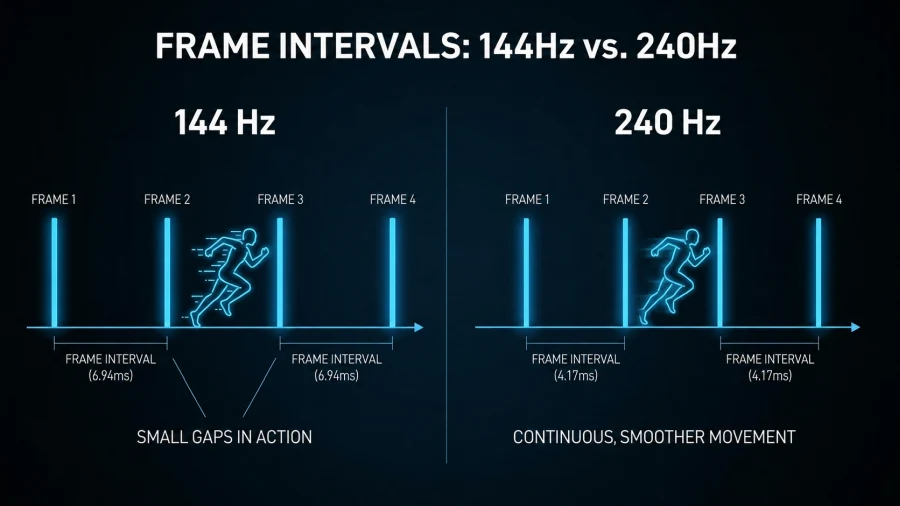
When placed side by side, the differences between 144Hz and 240Hz become clearer in specific areas.
In terms of visual smoothness and motion clarity, 240Hz has an edge, but it is a smaller leap than the jump from 60Hz to 144Hz. Many users, especially outside of competitive gaming, struggle to tell the two apart in casual play.
Input responsiveness also improves at 240Hz, since frames are updated more frequently, shaving small amounts of time off the delay between an action and its visual result. In competitive gaming, milliseconds matter, but for casual or narrative-driven games, this advantage rarely makes a practical difference.
This leads to the concept of diminishing returns. The upgrade from 60Hz to 144Hz is dramatic and easy for almost anyone to notice. The upgrade from 144Hz to 240Hz is far more subtle and tends to matter most to trained competitive players who have built muscle memory around fast visual feedback.
Price is another major differentiator. 144Hz monitors are widely available at budget-friendly prices, while 240Hz options carry a noticeable premium, both for the panel itself and for the system needed to run games at that refresh rate.
System requirements follow a similar pattern. A 144Hz setup is achievable with mid-range hardware, while a proper 240Hz experience typically demands a high-end GPU and CPU combination to avoid bottlenecking the display’s potential.
| Factor | 144Hz | 240Hz |
|---|---|---|
| Motion smoothness | Strong improvement over 60Hz | Marginal improvement over 144Hz |
| Input responsiveness | Very good | Slightly better |
| System demands | Mid-range hardware | High-end hardware |
| Price | Budget to mid-range | Premium |
| Best for | Most gamers | Competitive/esports players |
Who Should Choose 144Hz
144Hz is the better fit for budget-conscious gamers who want a meaningful upgrade over standard displays without spending heavily on both the monitor and the graphics card needed to drive it.
It also suits mixed-use setups, where a person splits time between gaming, work, and content creation. The smoothness benefits carry over into everyday tasks without requiring the extreme frame rates that 240Hz demands.
Anyone without a top-tier GPU will generally get more consistent, satisfying performance from a 144Hz display, since it is far easier to hit and maintain that frame rate across a wide range of games and settings.
Who Should Choose 240Hz
240Hz makes the most sense for competitive and esports-focused players, particularly those who play fast-paced first-person shooters where reaction time and tracking precision are directly tied to performance.
It is also a strong option for gamers who already own high-end GPUs and want to fully capitalize on that hardware, since a powerful graphics card paired with a lower refresh rate monitor leaves performance on the table.
Finally, 240Hz appeals to players who prioritize shaving off every possible millisecond of visual delay, even if the real-world difference is small. For casual gamers, this level of investment is usually unnecessary.
Other Factors to Consider
Refresh rate is not the only spec worth weighing. Panel type, whether IPS, TN, or OLED, significantly affects color accuracy, viewing angles, and contrast, and can matter just as much as refresh rate depending on your priorities.
Resolution also plays a role. Running a 1440p or higher resolution at 240Hz demands considerably more GPU power than doing so at 1080p, so buyers often have to balance resolution against refresh rate based on what their hardware can realistically support.
If you’re not sure what resolution your display is running at, you can check it with our What Is My Screen Resolution tool.
Response time, measured in gray-to-gray (GtG) milliseconds, affects how quickly pixels change color and can influence perceived smoothness and ghosting, independent of refresh rate. Pairing a high refresh rate with a slow response time can undercut some of the benefits.
Adaptive sync technologies like G-Sync and FreeSync also matter, since they reduce screen tearing by syncing the monitor’s refresh rate with the GPU’s frame output, which can improve the experience at either refresh rate tier.
Lastly, human perception has limits. Not everyone can reliably distinguish 144Hz from 240Hz, especially outside of fast, competitive scenarios. Reaction time, gaming experience, and even individual eyesight all influence how noticeable the difference actually feels in practice.
Q&A
Is 144Hz really that much better?
Yes, especially compared to a standard 60Hz display. The jump to 144Hz noticeably reduces motion blur and makes fast-moving scenes feel far smoother and easier to track. For most gamers, this is the upgrade that makes the biggest visible difference, more so than going from 144Hz to 240Hz later on.
Is 240Hz overkill for gaming?
For casual or story-driven gaming, yes, it often is. The benefits of 240Hz are most noticeable in fast-paced competitive titles like first-person shooters, where quick reactions matter. If you play slower genres or don’t have a high-end GPU to consistently hit 240 FPS, the extra cost may not be worth it.
Is 144Hz enough for gaming?
For the vast majority of gamers, yes. 144Hz offers a smooth, responsive experience that suits competitive and casual play alike, without demanding the high-end hardware that 240Hz requires. Unless you’re a dedicated esports player chasing every millisecond of advantage, 144Hz is more than sufficient.
Can the human eye see the difference between 144Hz and 240Hz?
It depends on the person and the situation. Trained gamers and competitive players often notice the difference during fast, erratic motion, but many casual users struggle to tell the two apart in everyday play. Factors like reaction time, gaming experience, and individual eyesight all influence how visible the difference really is.
Read Next
HDR Tone Mapping on TVs
QLED Technology: The Science Behind the Brilliance
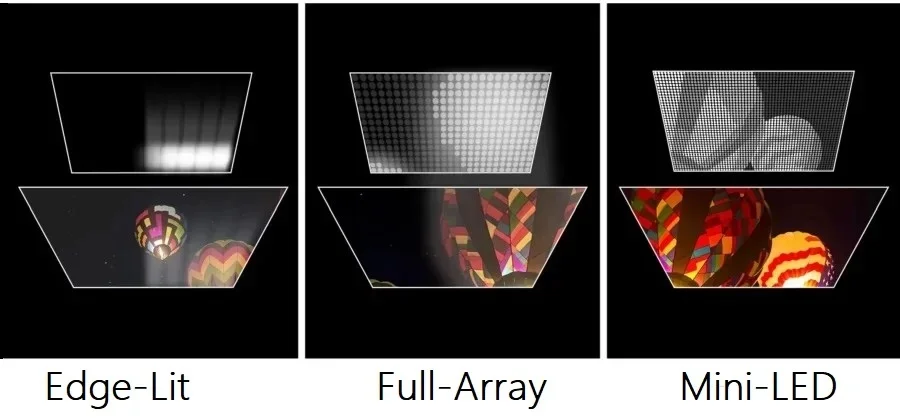
Local Dimming: Enhancing Contrast on TVs and Monitors
Mini LED vs OLED: Which Display Technology Reigns Supreme?
QLED vs LED: Which TV Should You Actually Buy?
LCD vs Micro-OLED in VR Panels: What the Display Tech Means for Image Quality
Blue PHOLED: Illuminating The Future of High-Efficiency Displays
Full Array LED vs OLED: Which Display Technology is Right for You?
HDR vs SDR: What You Need to Know
1440p vs 1080p: Which Resolution Should You Choose?
Samsung Odyssey OLED G8/G80SD S32DG80 Review: 4K 240Hz 0.03ms; Ultra-Sharp Masterpiece for Gamers

LTPO OLED Display Technology: AMOLED Gets Adaptive

UWQHD: Ultra-Wide Quad HD Resolution Explained