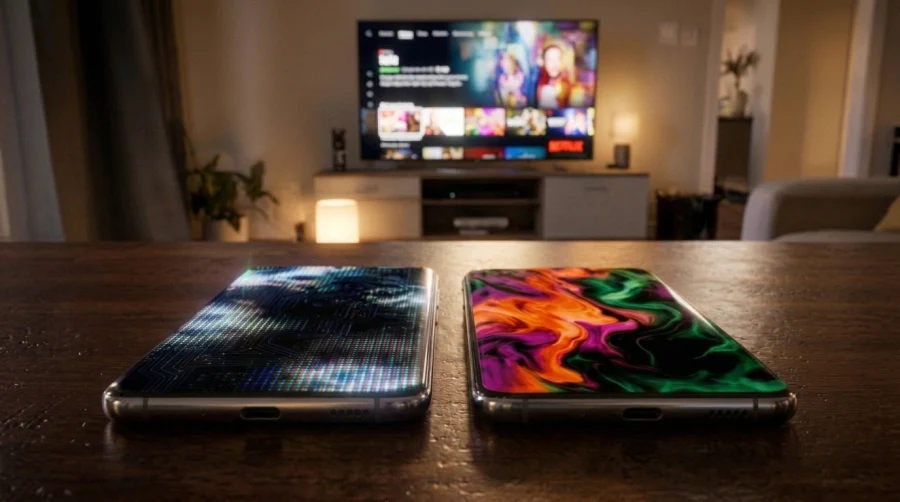
Walk into a phone shop or scroll through a TV listing and you will run into both terms. One handset advertises an AMOLED display, a rival boasts an OLED screen, and a television promises the same OLED technology as last year’s flagship. It is natural to assume the two are competing technologies and that one must be better.
Here is the twist: AMOLED is a type of OLED. The comparison is less a rivalry and more a question of naming, marketing and how a panel is built. This guide explains the real difference, why the labels are used so inconsistently, and what deserves your attention when you shop.
What Is OLED?
OLED stands for organic light-emitting diode. Each pixel is a tiny stack of organic compounds that glows when electric current passes through it. Because every pixel produces its own light, there is no backlight behind the screen.
That design brings several benefits. A pixel that is switched off emits nothing, so you get true blacks and effectively infinite contrast. Panels can be extremely thin and even flexible, which is why curved and foldable screens exist. Pixels also change state in a fraction of a millisecond, so motion looks crisp and responsive.
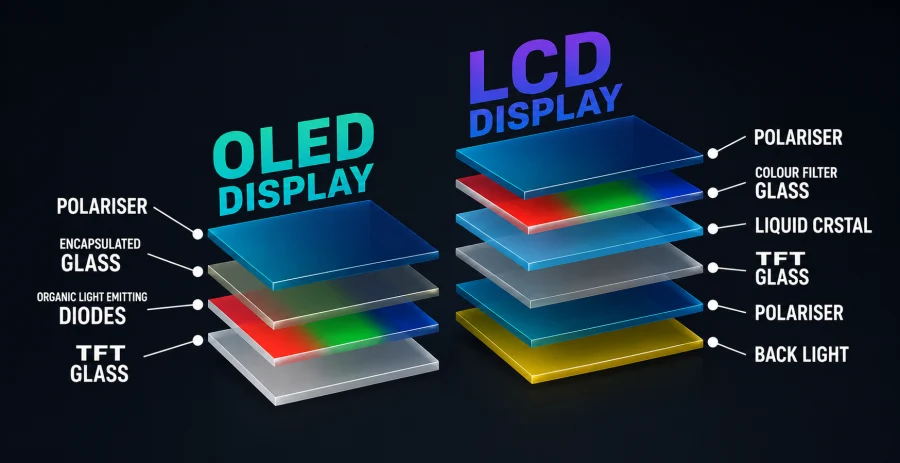
Compare that with a traditional LCD, which shines a white backlight through liquid crystals and color filters. Even with local dimming, an LCD struggles to block light completely, so dark scenes often look grey rather than black in a dim room. This is the main reason OLED has become the premium choice for phones and televisions alike.
What Is AMOLED?
AMOLED stands for active-matrix organic light-emitting diode. It is an OLED panel combined with a thin-film transistor (TFT) layer, a grid of microscopic switches that sits behind the pixels.
In an active matrix design, every pixel has its own transistor and a small capacitor, so it can be addressed individually and holds its state until the next refresh
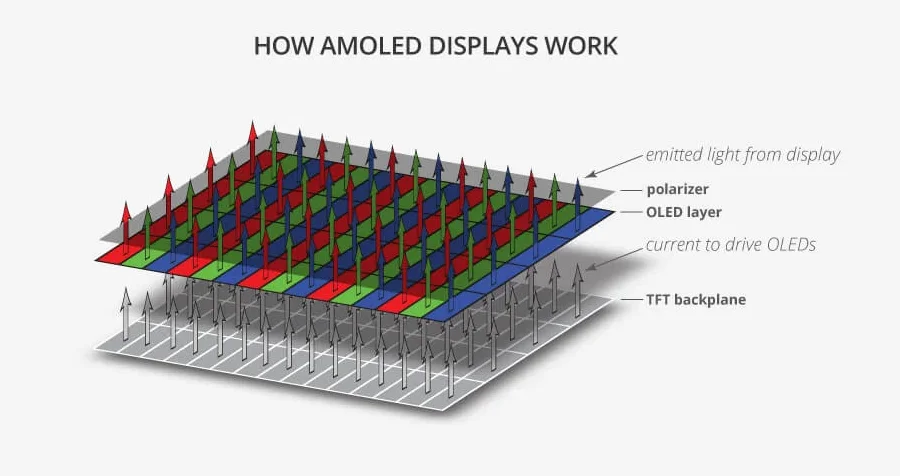
This matters for several reasons. Individual control allows faster refresh rates, better power efficiency and sharper images at high resolutions. It is also what makes smooth 90Hz and 120Hz phone screens possible, along with large displays that would be impractical with simpler driving methods.
You will find AMOLED panels in most modern smartphones, smartwatches and tablets, and increasingly in laptops and monitors.
The Real Relationship: Passive vs Active Matrix
OLED is the umbrella category, and there are two ways to drive an OLED panel: passive matrix and active matrix.
PMOLED screens arrange pixels in a grid of rows and columns and light them line by line. The approach is simple and cheap, but it needs high voltage per pixel, wastes power as the screen grows and limits resolution.
That is why PMOLED is confined to small displays, usually under three inches, such as fitness bands, small secondary screens and basic gadgets.
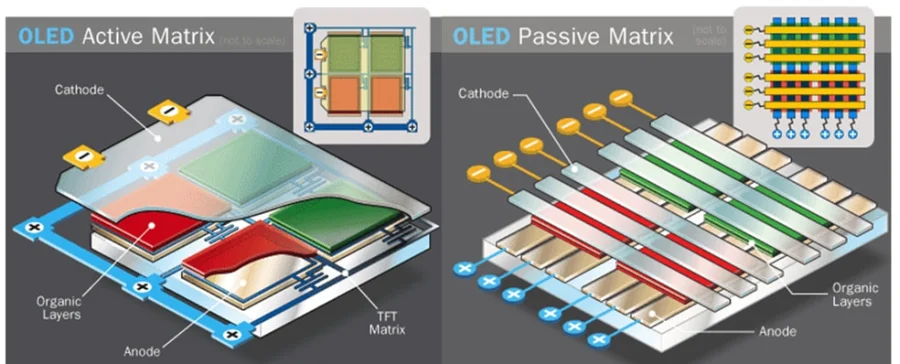
AMOLED solves those problems with the transistor layer described above, which is why it became the standard for nearly everything else. The family tree is short:
- OLED
- PMOLED (passive matrix, small and simple)
- AMOLED (active matrix, modern and scalable)
In other words, asking whether AMOLED is better than OLED is like asking whether a sedan is better than a car.
Why the Confusion Exists
Mostly, it comes down to marketing. Samsung popularized the AMOLED name for its mobile screens and later expanded it into branded variants such as Super AMOLED and Dynamic AMOLED. Apple, meanwhile, simply calls its iPhone screens OLED, usually with a branded name like Super Retina XDR. TV makers say OLED and nothing else.
Here is the catch: nearly every modern OLED phone and television uses an active-matrix backplane, which makes them technically AMOLED. The term simply stuck to mobile devices, while TVs kept the shorter name.
A few related terms add to the confusion:
- P-OLED means plastic OLED, built on a flexible plastic base instead of glass, which allows curved and foldable designs.
- LTPO is a backplane technology that lets a screen vary its refresh rate, from 1Hz up to 120Hz, to save battery.
- WOLED is white OLED, used in LG Display’s TV panels, where white subpixels pass through color filters.
- QD-OLED combines blue OLED emitters with quantum dots, delivering brighter, more saturated color on some premium TVs and monitors.
Head-to-Head Comparison
Since OLED is the category, the meaningful comparison is between its two driving methods. Here is how they stack up.
| Feature | PMOLED | AMOLED |
|---|---|---|
| Structure | Row and column grid, no transistor per pixel | TFT layer controls each pixel |
| Typical devices | Fitness bands, small secondary displays | Phones, watches, tablets, TVs |
| Image quality | Basic, limited resolution | High resolution, rich color, deep contrast |
| Power efficiency | Poor as size grows | Good, especially with dark content |
| Refresh rate | Low and limited | 60Hz to 120Hz and beyond |
| Cost | Cheap to produce | More expensive |
| Screen size | Under about 3 inches | From watches to large TVs |
Do the Differences Matter in Real Life?
When comparing PMOLED with AMOLED, the differences are obvious. Resolution, size, smoothness and efficiency all favor AMOLED.
When comparing an “AMOLED” phone with an “OLED” phone, the label tells you very little. Panel quality depends on the manufacturer, the generation of the panel and how the phone maker tuned it. A well-tuned OLED from one brand can easily beat an AMOLED from another.
These factors matter far more than the name:
- Peak brightness: how well the screen holds up in sunlight and how convincingly it displays HDR content.
- PWM dimming frequency: at low brightness, OLED screens often flicker rapidly to dim, and low-frequency flicker bothers some people’s eyes, so higher is better.
- Color accuracy: factory calibration and how natural skin tones look.
- Variable refresh rate: panels that scale down their refresh rate save battery while staying smooth when it counts.
Shared Drawbacks
Whatever the label, all OLED displays share some weaknesses.
Burn-in and image retention happen when static elements, such as navigation bars or channel logos, wear certain pixels faster than others. Modern panels and software tricks like pixel shifting reduce the risk, but it has not disappeared, especially on TVs used as computer monitors.
Flicker is the second concern, as noted above. Cost is the third, since OLED panels remain more expensive than LCD equivalents. Finally, large panels can be less bright than top-tier mini-LED LCDs, which may matter in very bright living rooms.
How to Choose
When choosing smartphones and wearables, don’t get caught up in the AMOLED vs. OLED labels. Focus instead on the actual specifications and independent reviews. Pay attention to brightness, flicker frequency, refresh rate range, and whether the display supports variable refresh rates. Also check the manufacturer’s promised software support, as the display is only one part of the overall package.
For TVs and monitors, the key comparison is WOLED versus QD-OLED. QD-OLED panels often deliver richer colors and higher color brightness, while WOLED technology is available across a wider range of models and price points. The best choice depends on your room’s lighting conditions, gaming preferences, and budget.
A quick checklist:
- Confirm the panel is OLED or AMOLED rather than LCD.
- Compare brightness figures from reviews, not just marketing.
- Look for high-frequency dimming if you are sensitive to flicker.
- Check the refresh rate and whether it is variable.
- Think about burn-in risk if you will show static content for hours.
- Read independent measurements instead of trusting branding.
Conclusion
AMOLED is a kind of OLED, so the real choice is not between two technologies but between individual panels. PMOLED sits at one end for tiny, simple displays, while AMOLED powers almost everything else, including most screens labeled plain OLED.
When shopping, use the technology label only as a starting point. Focus on the panel’s actual performance, including brightness, flicker behavior, color accuracy, and refresh rate. By comparing these factors, you can find an excellent display regardless of the technology name printed on the box.
Read Next

Best VPN for Security, Privacy, and Unblocking Content

HDR vs UHD: Enhancing Resolution and Contrast for the Best Visuals
Mini LED vs OLED: Which Display Technology Reigns Supreme?
QLED vs OLED: Understanding the Future of Television Display Technology
HDR10 vs 4K: Showdown for Superior Visuals
QLED vs UHD: What’s the Difference and Which One Actually Matters?
4K vs 5K Resolution: Which One Do You Really Need?
HDR True Black 400, 500, 600: New Era of Darker Blacks in Display Technology
LG 32GQ950-B Review: Nano IPS 1ms (GtG) 144Hz; High-End 4K Gaming
MSI G2712 Review: IPS 1920×1080 1ms 170Hz; Blend of Performance and Value
HDR vs OLED – What Sets Them Apart?
HDR10 vs HDR400 vs HDR600 vs HDR1000: Choosing the Right HDR Standard
Ultrawide vs. Dual Monitors: Which Setup Is Right for You?